Specialty Guides: Review AI Notes Efficiently: Ultimate Clinician Guide
Learn how to review AI notes efficiently. Master workflows for H&P, SOAP, and more while maintaining high medical documentation standards and patient safety.
What a medical scribe solves in modern practice
The burden of clinical documentation is a primary driver of physician burnout in modern healthcare. Between back-to-back patient visits and complex coding requirements, many clinicians find themselves spending hours after clinics close performing ‘pajama time’ charting. This administrative weight doesn’t just eat into personal time; it adds significant cognitive load, often leading to rushed notes, missed details, and increased medico-legal anxiety.
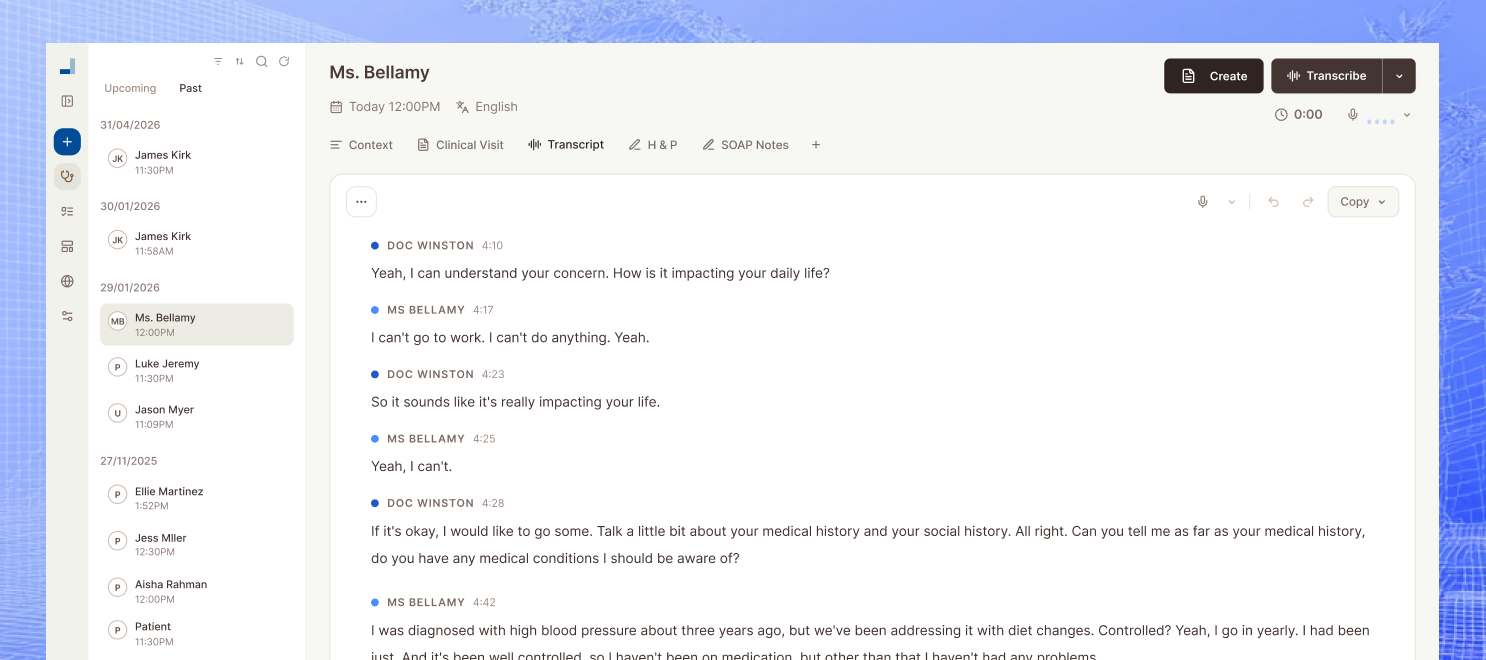
An AI medical scribe acts as a sophisticated digital assistant that captures the nuances of a patient encounter in real-time. By automating the heavy lifting of transcription and initial drafting, these tools allow practitioners to focus entirely on the patient rather than a screen. However, it is essential to remember that the AI serves an assistive role; the clinician remains the final authority and is ultimately responsible for the accuracy and clinical validity of the record.
- Eliminates the ‘pajama time’ documentation bottleneck.
- Reduces cognitive load by capturing details during the visit.
- Enables better patient eye contact and engagement.
- Acts as a draft generator while the clinician maintains final oversight.
Note types you can generate beyond SOAP (H&P and more)
While the SOAP note is the industry standard for daily progress, modern clinical practice requires a much broader range of documentation to ensure continuity of care. Using an AI scribe allows for the seamless generation of History and Physical (H&P) reports, consult notes, and complex procedure notes without manual repetitive typing. These different formats serve specific roles in the medical ecosystem, from capturing a comprehensive baseline to documenting specialized interventions.
Structure matters significantly for audit readiness and handover quality. For example, a discharge summary needs to be concise yet inclusive of all major hospital events, whereas a referral letter must highlight the specific ‘ask’ for a specialist. By leveraging AI to switch between these formats instantly, clinicians ensure that every stakeholder in the patient’s care journey receives the right information in the most useful structure.
- Generate comprehensive H&P, consult, and discharge summaries effortlessly.
- Ensure high-quality handovers and audit-ready documentation.
- Automate referral letters and follow-up notes based on visit data.
- Maintain consistency across different note types for better continuity of care.
How to implement Review AI Notes Efficiently step-by-step in a real clinic
To implement the process to review AI notes efficiently, start by applying the tool to a single, high-volume visit type. This allows you to calibrate the AI’s output without overwhelming your current workflow. For instance, a GP might start with routine follow-ups, while a specialist might focus on initial consultations where the history-taking is most intensive.
Next, finalize your specialty-specific templates. Most clinicians find success by setting up standardized frameworks for their most common diagnoses. During the encounter, whether in-person or via telehealth, ensure the device is positioned to capture clear audio. As the conversation flows, the AI organizes the data into your pre-selected structure, significantly reducing the amount of raw data you need to sort through later.
Once the encounter ends, immediately open the draft. Because the conversation is fresh in your mind, a rapid scan is usually sufficient to verify the medical logic. Finally, take the refined output and repurpose it. The same data used for the progress note can be instantly converted into a patient education summary or a referral form, maximizing the utility of a single recording session.
- Start with one common visit type to build trust and rhythm.
- Select specialty-specific templates to guide the AI’s structure.
- Review drafts immediately while the encounter is fresh.
- Repurpose the captured data for letters, forms, and patient summaries.
How to keep note quality high and reduce mistakes
High note quality is built on a foundation of verification rather than blind trust. Typical failure points in automated documentation include the accidental omission of PRN medications, incorrect numerical values like dosages or dates, and ‘note bloat’ where irrelevant conversational fluff is included. To combat this, clinicians should develop a ‘scan-first’ habit, focusing specifically on high-risk areas like the plan, medication changes, and objective findings.
Setting team standards for note review is equally vital, especially in multi-provider clinics. A lightweight review habit—where the clinician checks the HPI and Plan against their internal mental model—ensures that the final signed document is a true reflection of the encounter. Standardizing what constitutes a ‘good note’ across the clinic prevents variability and protects the practice from medico-legal risks.
- Focus reviews on high-risk areas like medication dosages and the Plan.
- Implement a consistent team standard for note finalization.
- Avoid note bloat by using concise, specialty-specific templates.
- Cross-reference the AI draft with your clinical findings immediately.
Privacy, consent, and patient trust (plain English)
Patient trust is the cornerstone of any medical practice. When introducing AI recording, transparency is your best tool. Explain to patients that you are using a digital assistant to ensure you can look them in the eye rather than at a keyboard. Most patients are incredibly receptive when they realize the technology allows their doctor to be more present and less distracted during the consultation.
A simple script can bridge the gap: ‘I’m using an AI scribe today to help me take accurate notes so I can focus entirely on our conversation. It’s secure and helps me provide better care. Is that okay with you?’ This approach respects patient autonomy and fulfills the basic requirements for verbal consent. Always ensure you are following local and regional guidelines regarding data retention and recording consent.
- Prioritize transparency to build and maintain patient trust.
- Use a simple, benefit-focused script to obtain verbal consent.
- Ensure data practices align with regional privacy regulations.
- Make patients feel heard by using technology to remove the computer barrier.
Rolling it out across a clinic without disruption
A successful rollout involves a structured 2-week pilot plan rather than a total overnight switch. During the first week, focus on an ‘early adopter’ MD or NP who can identify early bottlenecks. This pilot period is the time to align templates and ensure the software integrates smoothly with your existing EMR or patient management system without causing technical delays.
To measure success, track specific metrics such as minutes saved per day or the reduction in after-hours charting. Many clinics see a 50% reduction in documentation time within the first month. Once the pilot proves successful, use the gathered data to train the rest of the staff, ensuring all clinicians understand how to review AI notes efficiently and maintain the practice’s quality standards.
- Run a 2-week pilot with a small group before a full clinic rollout.
- Track time saved and after-hours work to quantify the benefit.
- Align templates across the team for documentation consistency.
- Provide focused training on the final review and editing stage.
Mcoy AI: Your Clinical Documentation Partner
Mcoy AI is an AI medical scribe that records and transcribes patient encounters, then generates multiple clinical note types (H&P, progress notes, consult notes, follow-up notes, procedure notes, discharge summaries, referral letters, and more). With over 200+ customizable templates and an interactive AI chat, clinicians can easily create letters, forms, and specialized documents from a single encounter. By streamlining the transcription process, Mcoy AI helps providers spend less time on administrative tasks and more time delivering high-quality patient care.
Frequently Asked Questions
Transitioning to an AI-assisted workflow is a significant shift. Here are the most common questions from clinicians about maintaining efficiency and accuracy.
How accurate are AI medical scribes in real clinics?
AI medical scribes are remarkably accurate today, often capturing 90-95% of clinical details correctly. However, they can occasionally struggle with heavy accents or very rapid multi-person conversations. Because they use medical-specific language models, they are much better at identifying clinical terms than standard transcription tools.
Do I still need to review every note?
Yes, the clinician is the person of record and must review every note before signing. The goal of the AI is to move you from ‘writer’ to ‘editor,’ which is significantly faster. A quick scan to verify medications, dosages, and the final assessment is necessary for patient safety.
What note types can an AI scribe generate besides SOAP?
Beyond standard SOAP notes, AI scribes can produce H&Ps, consultation reports, procedure notes, and discharge summaries. They can also drafts referral letters or patient-friendly summaries of the visit. This versatility ensures that all parts of the medical record are consistent and comprehensive.
Will this work for telehealth and in-person consults?
Most AI scribes are designed to work across both modalities. For telehealth, the AI can capture audio directly from the computer audio or a browser extension. For in-person visits, a mobile app or a dedicated microphone on the desk is typically used to capture the conversation.
How do I explain recording/transcription to patients?
Focus on the ‘patient-first’ benefit of the technology. Tell them that the tool allows you to stop typing and start listening. Once they understand that the data is handled securely and helps you provide better care, the vast majority of patients are completely comfortable.
How do clinics prevent note bloat?
Note bloat is prevented by using concise templates that instruct the AI to only include clinically relevant information. By setting ‘hard stops’ or specific sections in your template, you can ensure the AI isn’t including irrelevant small talk in the medical record.
How long does template setup take?
Initial setup for basic templates usually takes less than an hour. However, fine-tuning your more complex, specialty-specific templates may take a few days of use as you see how the AI interprets your specific style of consultation and clinical reasoning.
What’s the safest way to start if I’m skeptical?
The safest way is to start with a ‘shadow’ approach: record a few visits but continue your normal note-taking process for those patients. Compare your manual note to the AI draft afterward. Once you see the accuracy and save time on those few cases, you can gradually phase out the manual drafting.
Conclusion
In conclusion, mastering the ability to review AI notes efficiently is the final piece of the puzzle for a modern, tech-forward clinic. By implementing a structured review process, utilizing diverse note types like H&P and referral letters, and maintaining clear patient consent, you can reclaim your time without sacrificing note quality. Start your pilot today and see how documentation can move from a burden to a seamless part of your care delivery.
What a serious review table should cover
| Decision area | Common mistake | Better clinic-ready approach | Metric to watch |
|---|---|---|---|
| Workflow design | Treat review ai notes efficiently: ultimate clinician guide as a one-off documentation task | Build a repeatable process with clear ownership and review points | Time to complete documentation |
| Team adoption | Assume every clinician will naturally use the same process | Train for consistency and define exception handling early | Active user adoption |
| Quality review | Only check notes when a problem is reported | Audit a sample of notes weekly and review edge cases | Edit rate per note |
| Operational follow-through | Leave admin actions outside the documentation workflow | Use the same encounter data for referrals, letters, and follow-up tasks | Completion rate for next-step tasks |
Related reading
If you are working through review ai notes efficiently: ultimate clinician guide, it helps to read this alongside Specialty Guides: How to Run a More Efficient Medical Practice in 2026, Specialty Guides: How to Improve Patient Encounters, and Specialty Guides: AI Scribe for Psychiatry Progress Notes: The Full Guide. Those guides cover adjacent workflow, implementation, and evaluation questions so the decision does not sit in isolation.
FAQ
How accurate are AI medical scribes in real clinics?; Do I still need to review every note?; What note types can an AI scribe generate besides SOAP?; Will this work for telehealth and in-person consults?; How do I explain recording/transcription to patients?; How do clinics prevent note bloat?; How long does template setup take?; What’s the safest way to start if I’m skeptical?